
Grinding through the ranked ladder or preparing for Clash with friends? Tracking your numbers is one of the fastest ways to understand your performance. One stat stands out the most: your League of Legends win rate.
Your win rate shows how consistently you win matches and how well you perform with specific champions and roles. If you’re serious about improving, learning how to check win rate in League of Legends is essential.
Want more helpful guides and tools? Explore more at PlayPlex.
Why Your LoL Win Rate Matters
Before checking your win rate, it’s important to understand why this stat matters.
Your win rate helps you:
- Identify your strongest champions
- Track your performance across seasons
- Understand trends in your gameplay
- See whether your macro and micro skills are improving
- Get a performance snapshot using real LoL performance stats
Unlike teammates who blame everyone else, the numbers don’t lie. A rising win rate often means you’re improving. A falling one signals it’s time to adjust your champion pool, builds, or strategy.
Method 1: Checking Your Win Rate in the League Client
The official League of Legends client shows basic stats — but it does not display your win rate directly.
You can see:
- Match history
- Wins/losses
- KDA
- CS per minute
- Damage stats
- Role performance
But the client lacks:
- A dedicated LoL win rate tracker
- Champion win rate breakdowns
- Long-term win rate history

This is why players rely on third-party sites for accurate analytics.
Method 2: Using a Third-Party LoL Win Rate Tracker
Third-party stat websites give the most accurate and detailed breakdowns of your performance. These platforms act as full-featured LoL win rate trackers.
The best options include:
- OP.GG
- League of Graphs
- Mobalytics
- Blitz.gg
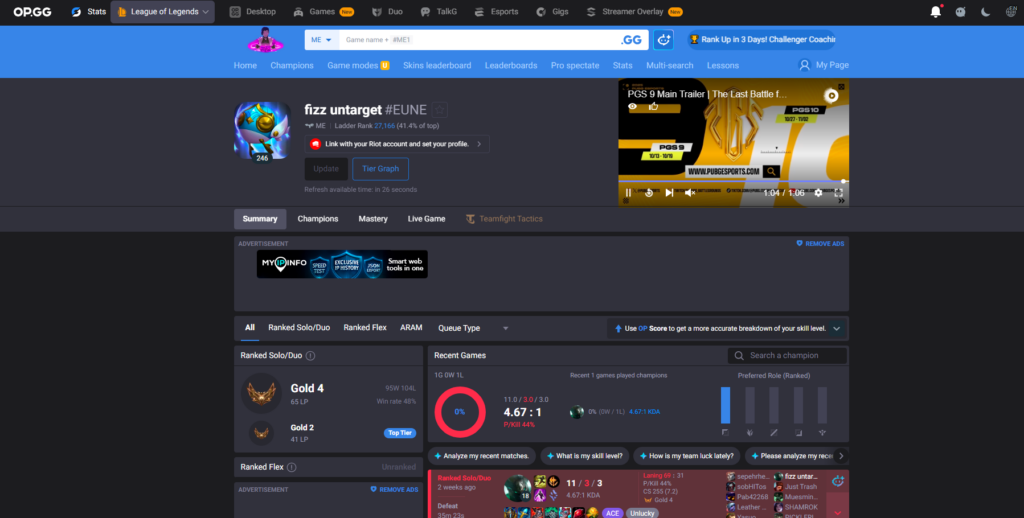
How to Check Your Win Rate on OP.GG
Follow these simple steps to view your OP.GG win rate:
- Open OP.GG in your browser
- Select your region
- Enter your Summoner Name and Tag
- View your profile
- Click the Champions tab for detailed champion win rates
OP.GG shows your match history, KDA, CS/min, champion win rate LoL stats, and performance trends — making it the most popular tool.
Other platforms like Mobalytics offer matchup insights, while League of Graphs gives long-term data and graphs.
Why Third-Party Tools Are Better
Using these platforms gives you:
Historical Data
See your win rate across multiple seasons.
Champion-Specific Stats
Track your performance with each champion individually.
Detailed LoL Performance Stats
You get more than just win rate:
- Vision score
- Damage
- CS/min
- KDA
- Trend graphs
- Matchups
- Role efficiency
This gives you a complete picture of how you’re performing.
Using Your Win Rate to Improve
Knowing your win rate is the first step — using it to improve is where real progress happens.
High win rate on a champion?
Make them your primary pick.
Low win rate?
Revisit your item builds, matchups, or watch a few high-elo guides.
Want to climb faster?
If you’re improving but still struggling to rank up, consider safe, professional options like LoL boosting services.
Want to practice champions without hurting your MMR?
Many players train new champions on LoL smurf accounts to protect their main account.
Low sample size?
A high win rate over 5 games means nothing — aim for at least 30–50 games for accuracy.
By consistently tracking your stats, you’ll spot trends, understand your strengths, and fix weak spots. This data-driven approach is how serious players climb.